Jumat, 30 Oktober 2009

WiFiPhoto App Review.

WiFiPhoto is an alternative to syncing your photo's from your iPhone via iTunes. Plus its a LOT faster!

You can add pictures from your camera roll by simply tapping on them to activate the red tick. Click as many as you want and then click done at the top.


Then all the selected photo's appear in a list. At the bottom is a URL link to your photos. Open your web browser on your PC and enter the address.


After going to the link in your web browser the following page appears. Click each image individually and download them, or click the download zip button, and download them all in a compressed zip file.


Its fast and effortless. Unlimited photo's, no quality loss and only 59p. Another app you'll never know how you lived without!

Rabu, 28 Oktober 2009

Air Mouse Review.

Air Mouse allows you to control your laptop/pc/mac with your iPhone. Acting like a mouse you can control the cursor, right and left click, scroll, and thats just the beginning!


Air mouse was recommended to me by a friend who had found it for 59p in the app store. It allows control of the mouse via 2 different ways

This is the trackpad. It works in the exact same way as the one on a laptop. Touch it to move the cursor around the screen. Touch the arrows at the bottom and scroll your finger up and the down the screen and you have a scroll function. The buttons to the left and the right of the scroll are your left and right click.

The Keyboard is fully functional, allowing CTRL, ALT and the WINDOWS key for extensive functionality of your computer. Shake your phone up and the keyboard appears. Shake it down it is disappears. Press the arrow key on the keyboard (Top Right) and we move on.


This is the function screen. Using the computer software that coincides with the app, you can change the functions keys to represent different programs. For instance, itunes, firefox, safari etc. Clicking the appropriate button will open the program on the computer that its associated with.

The buttons at the bottom can control programs on the computer. The arrows represent forward and back for instance in firefox. The home key will take you to the browsers home page. The enter key will do the same as if you had pressed enter on the actual computer keyboard.


The button at the top right of the screen switches the trackpad, the scroll in now directly in the middle and a lot bigger.


Turn the iPhone landscape and you get a wide trackpad. The left and right clicks are at the bottom and the scroll function is on the right side.


This is another function screen, this one controls the a web browser with a series of buttons.

Back, Search, Home, Forward, Refresh, Stop and Favourites.


The second way of controlling the computer is via the "air mouse". It uses the accelerometer built into the iPhone to move the cursor around the screen. Very tricky to get the hang of, but once you've got it, it works amazing well.

Currently this app is only 59p. It would criminal to miss out. Its taking pride of place on my iPhone, and although it won't be used too often. Its there when i'm sat on the sofa and my laptop is on the other side of the room hooked up to the tv and i need to pause the movie.

Senin, 26 Oktober 2009

Do your brands operate in Asia? Get your new web address registered

Reading the Bangkok Post over breakfast this morning I note that ICANN (The Internet Corporation for Assigned Names and Numbers) have announced that as on Friday (30th October 09) they should get approval for URL's to use non Latin alphabets (in their entirety, not just partially as is currently the case).

By mid 2010 it should therefore be possible for brands operating in Chinese, Arabic, Korean and Japanese languages to have relevant web addresses. This move is aimed at improving user experience, helping consumers reach sites more quickly across the huge parts of the world that use non-Latin based scripts and combined with restrictions on top level domain names being lifted (for example banks will be able to have .bank as a suffix etc rather than being restricted to .com, .co.uk. co.jp) etc should save an estimated 60-100 billion keystrokes a day worldwide!

I'll be off to twiddle my thumbs with all that spare time saved. Meanwhile if you have brands operating in those markets I'd be off to register interest in the domains pretty quickly so that there's no cybersquatting issues.

Minggu, 25 Oktober 2009

The meerkat is marvellous but not just by coincidence

My fondness for Alexsandr Orlov, the star of Compare the Meerkat oops I mean Market's social success story is well evidenced (at least for my regular readers).  Snuffling around Slideshare this evening I found the presentation below which pulls the whole campaign together nicely for you. If you don't use Slideshare or Scribd as a research resource when you are looking for thought, fact or inspiration you should, not to mention considering the role these document sharing sites play when you have content to publish.

Jumat, 23 Oktober 2009

How to make (mobile) operating systems sound exciting..

Let's face it, the majority of people don't care what operating system their PC or mobile works on, as long as it works. Most don't know what the difference between a browser and a search engine is.


It's a so what thing. So trying to make people even think, let alone care about it is never going to be easy.

Microsoft finally released Vista replacement Windows 7 this week but whilst there's been some noise in the tech press about it, and I've seen point of sale materials in some stores I suspect to the masses it's gone largely unnoticed.  That might be an oversight though because apparently it's actually quite good!

I'll therefore award points to US network Verizon for this teaser piece about the Google Mobile operating system (known as Android) and a new Motorola phone that runs on it.


It's humorous, it pokes fun at the iPhone which is definitely the better known and deemed sexier mobile-lovers gadget of choice. It engages and stimulates curiousity, leading you to a site which invites onward engagement with a sign up opportunity.


Good stuff.

Trident (gum) bring you a Friday smile

Ok, so now I've spoiled it for you admittedly, but fairplay to Trident chewing gum for backing this fun video improv piece. No doubt it will make you smile for it is cheesier than a ripe brie, but disgusting habit as it is, gum's a very useful tool in your oral hygiene routine to help keep your smile in tip top form, so the association works (for me at least).


That said I am still not sure it's as good as one of the first of these flash mob / improv pieces I saw last year (from lastminute.com) and for whom the fit is even better. I bring you Stansted airport a place that could definitely use some cheering up...

Kamis, 22 Oktober 2009

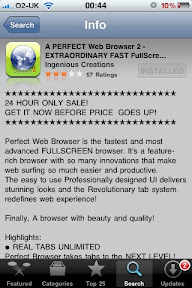
Perfect browser 2 review

When I heard rumours that firefox for the iPhone was nearly here, I decided to check out what other browsers are available on the app store..

I came across perfect browser 2.


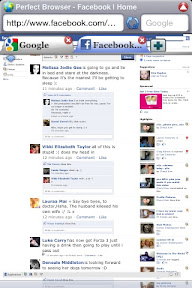
Reading through the features it sounded amazing! Tabbed browsing, claiming to be faster than safari. Fooling web pages into believing it was an actual browser; no more cruddy mobile sites.

Priced at 59p I gave it a whirl.. It's not quite the amazing browser it made itself out to be.

It's slow, clunky and does not like remembering passwords or history.


Tabs are slow and do not like being closed. Facebook made the browser freak out.

It's not a safari killer.. But use it if you fancy a change. It tries to hard to be safari. You can't beat the best.. So why try?